


Behavioral Health Compliance Dashboards: Turn Required Documents Into Action

Behavioral health organizations manage a constant flow of required documentation, including quarterly forms, treatment plans, state reporting forms, scheduled client interactions, assessments, authorizations, and follow-up activities. When this information is scattered across an electronic health record, spreadsheets, calendars, and static reports, an approaching deadline can easily become a missed requirement.
Behavioral health compliance dashboards bring those requirements into one clear, accessible view. Pinnacle Health Informatics helps organizations create dashboards and scorecards that show what is complete, what is coming due, and what needs attention now.
What Is a Behavioral Health Compliance Dashboard?
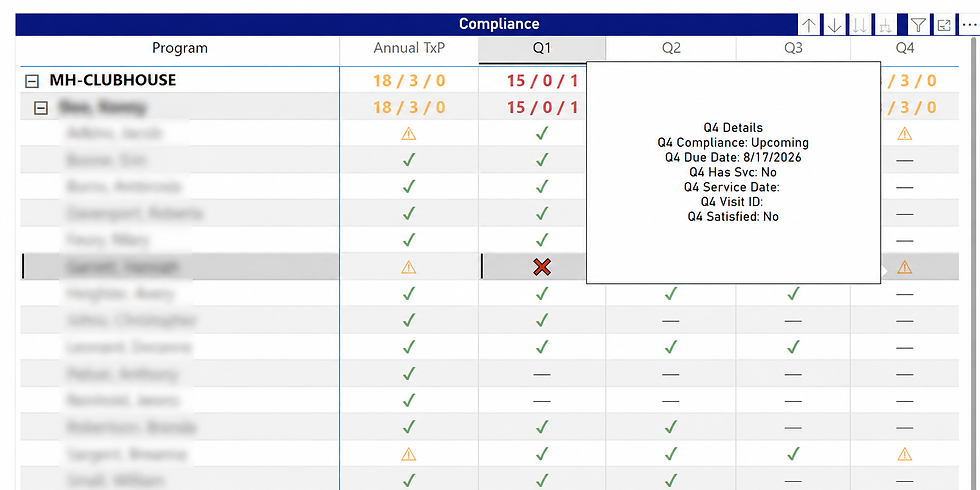
A behavioral health compliance dashboard is a visual reporting tool that tracks required documents, deadlines, scheduled activities, and other compliance measures. It converts operational data into status indicators, due dates, alerts, summary counts, and trends that staff and leaders can understand quickly.
Instead of reviewing separate spreadsheets or long record lists, authorized users can move from a high-level compliance scorecard to the underlying detail. Color coding can distinguish compliant, upcoming, due-now, and overdue items. Filters and drill-through views can help users find the relevant program, team, employee, caseload, or reporting period.
A strong dashboard answers the questions that drive daily action: Which requirements are complete? What is approaching its due date? What is overdue? Are scheduled client interactions taking place as expected? Where is follow-up needed most?

Why Required Document Tracking Becomes Difficult
Documentation rules rarely follow one universal schedule. One form may be due quarterly, another annually, and another within a specific number of days after an admission, assessment, service, or other triggering event. Requirements can also differ by program, population, payer, funding source, or state.
Manual tracking requires staff to determine which rule applies, whether a qualifying document or interaction has occurred, when the reporting period begins and ends, and what date the next item is due. That work becomes harder as caseloads grow and rules overlap.
A document compliance dashboard applies these business rules consistently. It can calculate due dates, identify missing activity, assign a current status, and automatically surface exceptions. This gives teams more time to correct a gap before a deadline passes.
How Quarterly Compliance Scorecards Help
Quarterly compliance reporting is easier to manage when each required period and its status are visible in one place. A scorecard can display each quarter and classify the associated requirement as compliant, upcoming, due now, or out of compliance.
For example, a 30-day alert can identify records entering a due-date window. Staff can then follow up while there is still time to complete the requirement rather than discovering the issue after the reporting period closes. Supervisors can scan the same dashboard to identify patterns across teams or caseloads.

Track More Than Quarterly Forms
The same reporting approach can support many time-sensitive clinical and administrative activities. Depending on an organization’s workflows and available data, a compliance dashboard can monitor:
Required state forms, treatment plans, service-plan reviews, assessments, reassessments, authorizations, renewals, and annual or quarterly documentation.
Scheduled client interactions, required contacts, post-discharge follow-up, and other activities that must occur within a defined period.
Bringing these measures together creates a more complete view of operational compliance. It helps teams move from retrospective reporting to proactive management by identifying upcoming obligations before they become missed requirements.
The Right Information for Every Role
Different users need different levels of detail. Executive leaders may want organization-wide compliance rates and trends. Program directors may need comparisons across services or locations. Supervisors may need a prioritized view of upcoming and overdue items. Frontline staff may need a focused view of the requirements connected to their assignments.

A layered dashboard can serve each audience without forcing everyone to work from the same report. Leadership can begin with summary measures, while authorized users can drill into the details needed for follow-up. Role-appropriate access remains essential so operational visibility supports privacy, security, and minimum-necessary access practices.
Custom Compliance Dashboards From Pinnacle Health Informatics
Every organization has its own programs, terminology, systems, and reporting obligations. Pinnacle Health Informatics works with organizations to define the business rules behind each requirement and create reporting that fits the way their teams operate.
A solution might include interactive compliance dashboards, employee and program scorecards, quarterly document tracking, state-form monitoring, scheduled client interaction reporting, configurable warning windows, or drill-through details for authorized users. The design follows the organization’s priorities rather than a one-size-fits-all template.
The result is a shared, reliable view of critical requirements that makes the data easier to understand and the next action easier to identify.

Make Compliance Data Clear and Actionable
Required documents and scheduled client interactions are too important to manage through fragmented reports and manual checks. A behavioral health compliance dashboard can improve visibility, strengthen accountability, and direct attention to the requirements that need it most.
Pinnacle Health Informatics can transform your existing data into dashboards and scorecards designed around your programs, reporting rules, and workflows.
Ready to make your compliance data clearer and more actionable? Contact Pinnacle Health Informatics to discuss a custom compliance dashboard for your organization.


Comments